Skip to content
Cortex Shield

Check apps, files and links for known threats.

Cortex Shield compares the apps on your Android phone, APK files, other files and links against published threat indicators, on the phone. Every result explains what was found and why — and the app never changes anything. You decide.

  • Analysed on your phone
  • No account
  • Never removes anything

Tell me when Cortex Shield launches

One email, the day it is on Google Play. We keep your name and email for that and nothing else.

See our privacy policy.

See what it checks
Android 8.0 or newerComing to Google Play
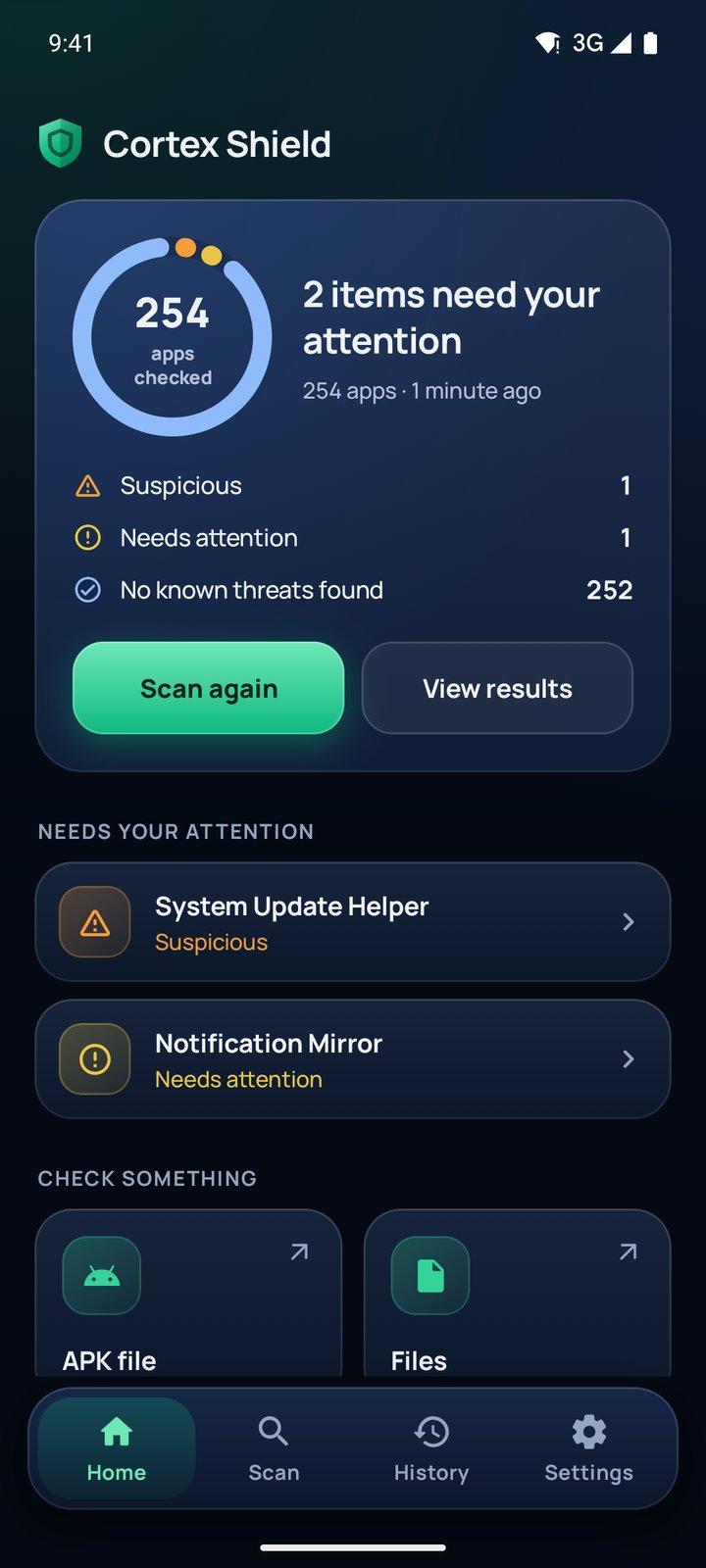
Home after a scan of 254 apps on a test phone: one Suspicious, one Needs attention and 252 No known threats found, with the two test apps listed under Needs your attention.

A test phone. The two apps it flags are our own test apps, not real products.

What it checks

Five things to check, one app.

It compares what you give it with published threat indicators, and looks for traits that harmful apps often show. Everything is analysed on the phone.

Installed apps

Every app, compared and examined.

Each app's signing certificate, file hash and package name are compared with the threat database. It also looks for structural tricks in app files and risky combinations, such as an app from outside an app store that can read your screen and your text messages.
APK files

Check an app file before you install it.

Open it from your file manager or share it to Cortex Shield. Nothing is ever installed.

Files and folders

Files you pick, matched against known threats.

Pick files with the system file picker. Disguised apps and programs are pointed out, and files are matched against known threats.

Links

Check a link without opening it.

Paste or share a link. It is compared with known phishing sites and examined for lookalike tricks, such as a brand name placed in front of another site. The link is never opened and never sent anywhere.

Device check

Eleven settings, each one a tap away.

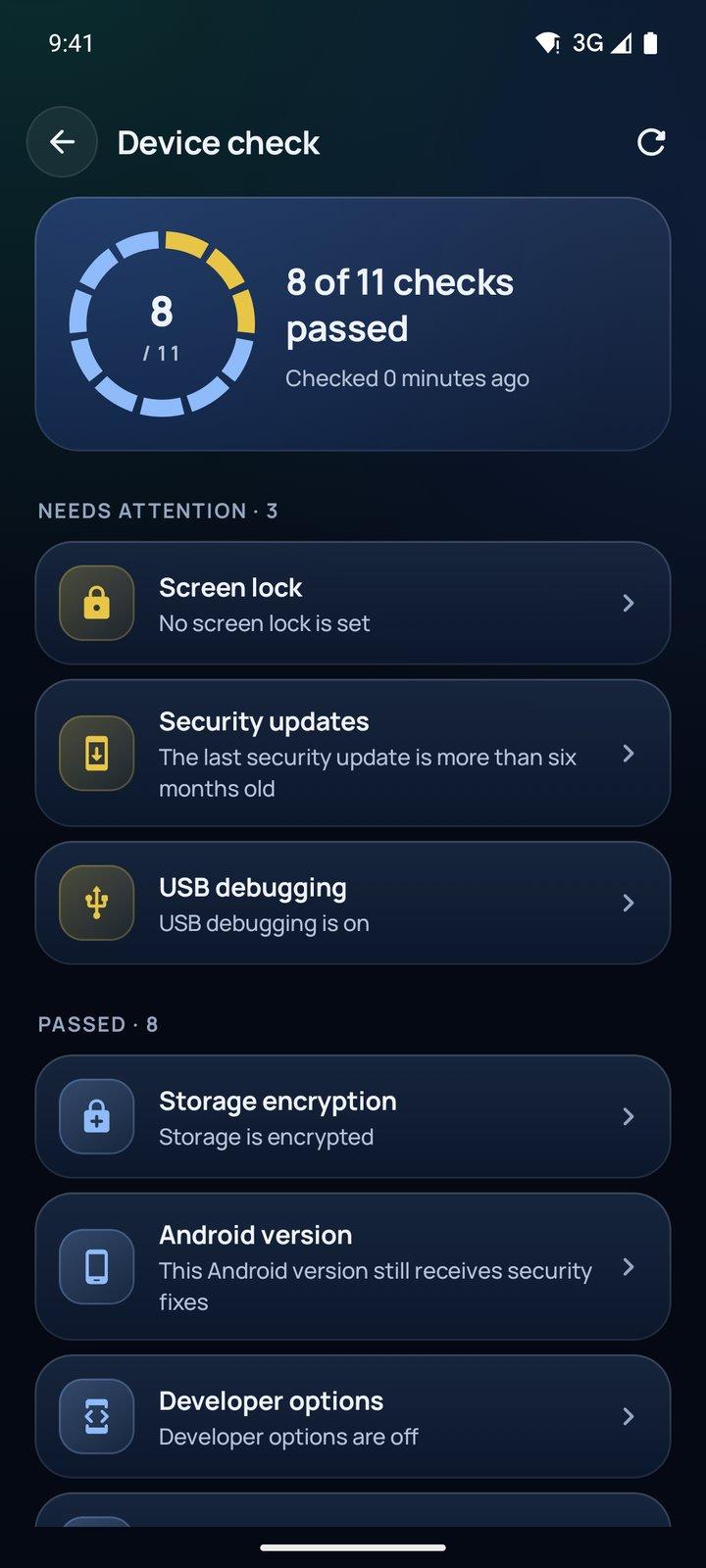
Reviews eleven settings that affect the device's security, such as screen lock, security update level, USB debugging, and which apps from outside an app store can read notifications. Each item opens the system setting where you can change it.

Results

Five answers, each with a reason.

No scanner can promise that something is harmless.

  • Known threat

    This matches an entry in the threat database.

  • Suspicious

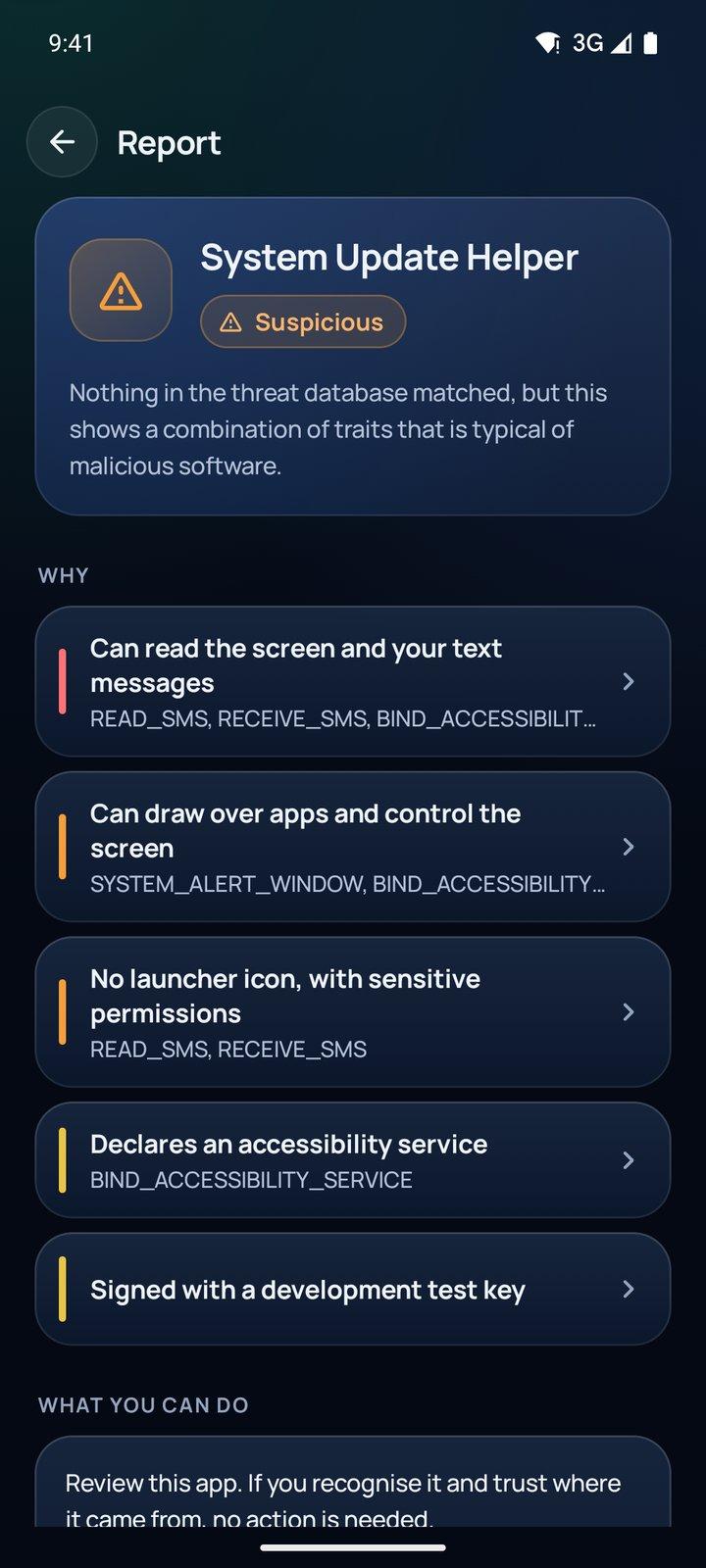
    Nothing in the threat database matched, but this shows a combination of traits that is typical of malicious software.

  • Needs attention

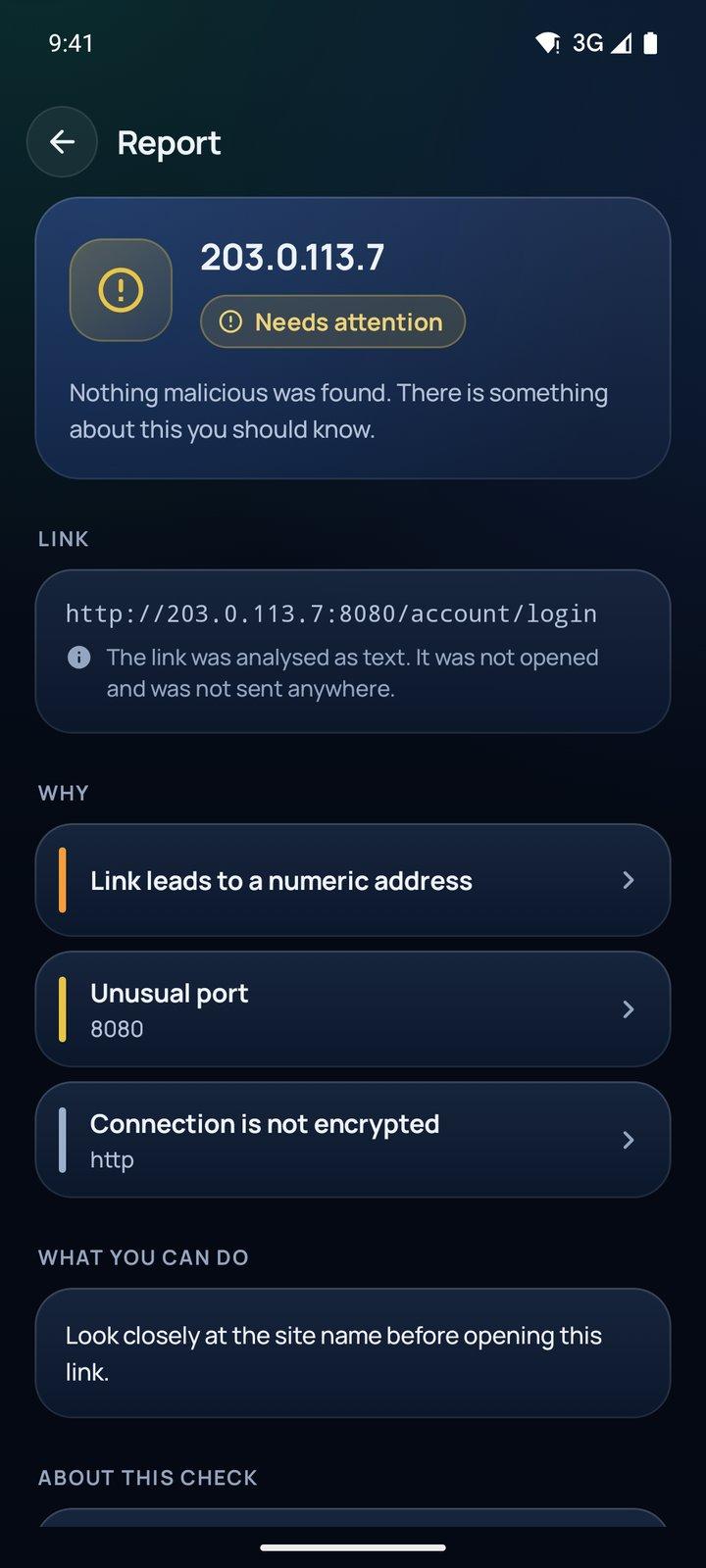
    Nothing malicious was found. There is something about this you should know.

  • No known threats found

    Nothing matched the threat database, and nothing that was found adds up to a concern. This is not a guarantee that it is harmless.

  • Could not be fully checked

    Part of this could not be read or analysed, so the check is incomplete.

A look inside

Every screen is the real app, captured on a test phone. “System Update Helper” and “Notification Mirror” are our own test apps, made to be flagged, and the counts are that test phone's, not a typical result.

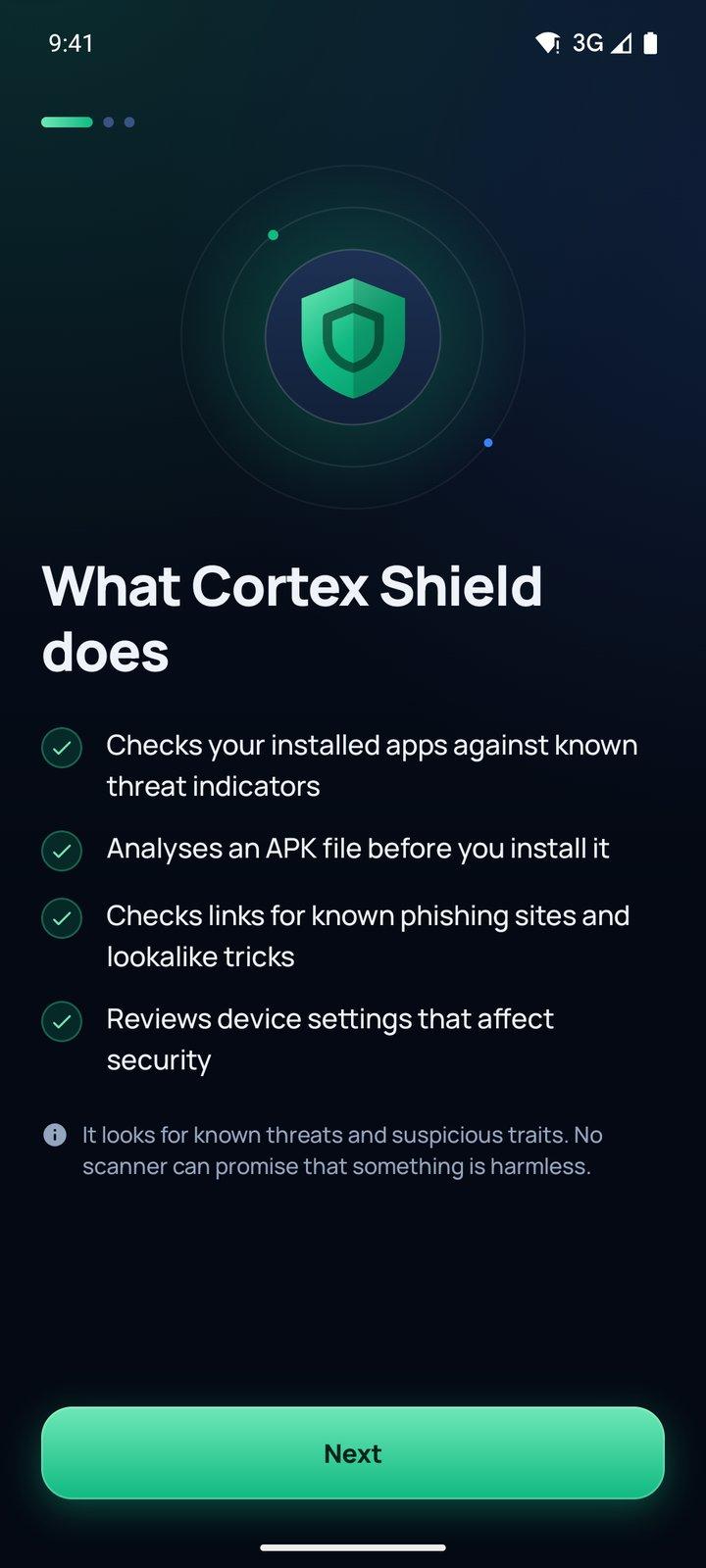
First screen, “What Cortex Shield does”: checks installed apps against known threat indicators, analyses an APK file before you install it, checks links for known phishing sites and lookalike tricks, reviews device settings that affect security; “No scanner can promise that something is harmless.”
What it does, said first.
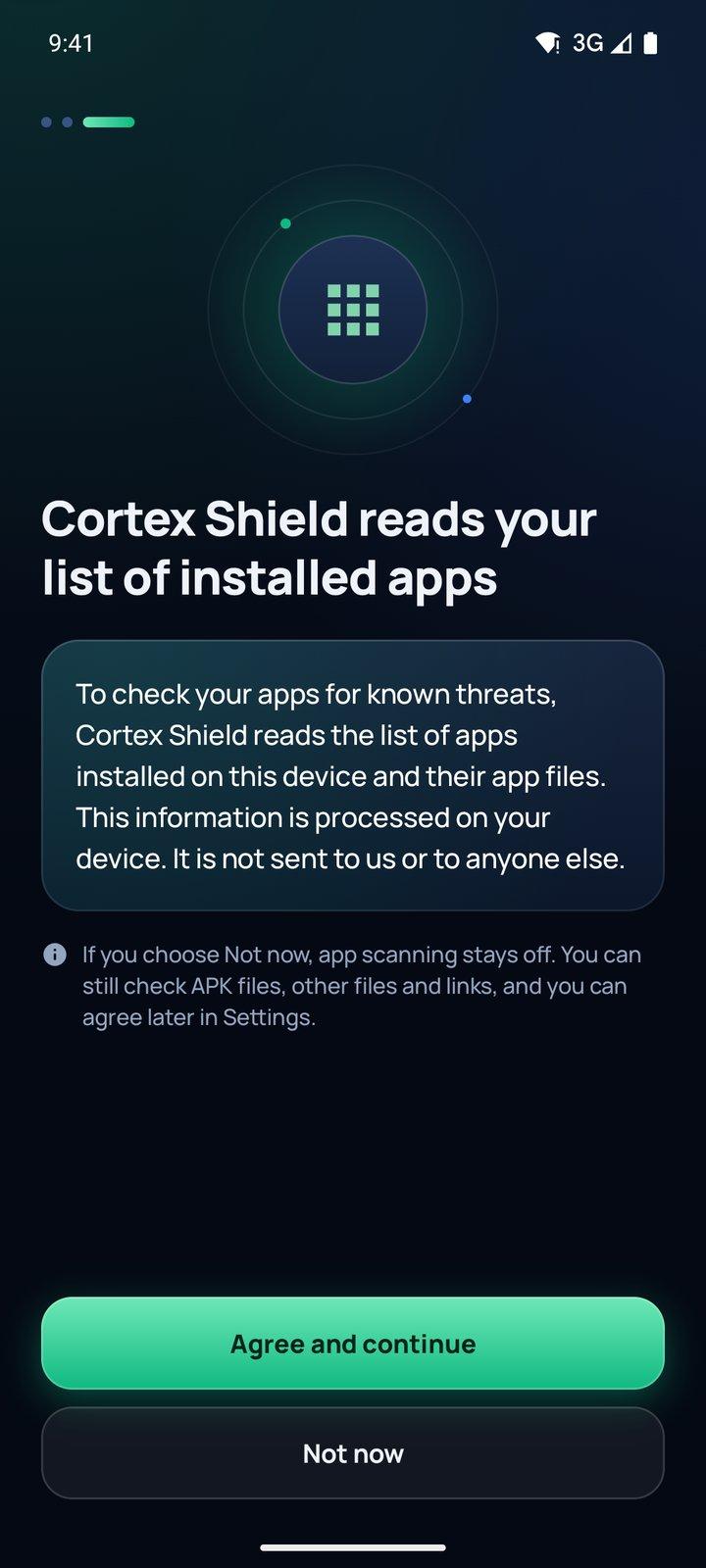
The agreement screen, “Cortex Shield reads your list of installed apps”: the list and app files are processed on the device and not sent to anyone. Agree and continue, or Not now, which keeps app scanning off while APK files, files and links can still be checked.
It asks before reading your app list.
Home after a scan of 254 apps on a test phone: one Suspicious, one Needs attention and 252 No known threats found, with the two test apps listed under Needs your attention.
Results, counted plainly.
Report for the test app System Update Helper, marked Suspicious: it can read the screen and text messages, can draw over apps, has no launcher icon but has sensitive permissions, declares an accessibility service, and is signed with a development test key.
Every result says why.
Report for a link to a numeric address (203.0.113.7, a documentation address) on port 8080 over plain http, marked Needs attention, with “Look closely at the site name before opening this link.”
A link, checked as text.
Device check, 8 of 11 checks passed. Needing attention: no screen lock set, last security update more than six months old, USB debugging on. Passed: storage encrypted, among others.
Settings worth a look.
Privacy

Checked on the phone. Kept on the phone.

It goes online for two things only: threat database updates, which carry no identifier, and Google Play purchases.

  • Your app list, the files you scan and the links you check are analysed on the phone and never uploaded
  • It asks before reading the list of installed apps, and you can say no
  • No account, no ads, no analytics, crash-reporting or tracking SDKs
  • Results and history stay on the phone, excluded from cloud backup

Good to know

What it does not do.

  • It never removes anything

    Cortex Shield never deletes, quarantines, blocks or uninstalls anything. It explains what it found and opens Android's own app info screen, so you decide.

  • It is not a VPN and doesn't block websites

    Links are checked only when you paste or share one, as text.

  • It doesn't watch the phone in real time

    It examines apps without running them. Scans run while the app is open; Pro adds scheduled scans and checks of new and updated apps in the background.

  • Its threat data is not a complete list

    It covers stalkerware, spyware indicators, phishing sites and apps signed with leaked Android platform keys, from openly licensed sources. It is not a list of every piece of Android malware.

  • Some apps are out of its reach

    Apps in a work profile or Private Space can't be examined.

More answers, and a way to reach us, on the support page

What you need

An Android phone, Android 8.0 or newer.

No account. Android phones only, from Google Play. Apps in a work profile or Private Space can't be examined.

Free and Pro

The checking is free.

Scanning, the threat database and everything about a known threat stay free.

Free

  • Every scan
  • The full threat database
  • Full details for any known threat
  • 30 days of history

Cortex Shield Pro

  • Scheduled scans that run by themselves
  • New and updated apps checked in the background
  • Full details in every report: signer, source, hash, permissions
  • Export reports as PDF or JSON
  • Unlimited history (free keeps 30 days)
  • Check several links at once

Pro is a monthly or yearly subscription through Google Play, and you can cancel it at any time. Its price is not set yet; Google Play shows it before you subscribe.

Where the threat data comes from

Stalkerware, spyware indicators, phishing sites and apps signed with leaked Android platform keys, from openly licensed sources. It is not a complete list of Android malware. Updates are signed and verified on the phone before use, and everyone gets the same database.

It explains. You decide.

Free to download. No account. Coming to Google Play.

Tell me when Cortex Shield launches

One email, the day it is on Google Play. We keep your name and email for that and nothing else.

See our privacy policy.

Google Play and Android are trademarks of Google LLC.

Chat on WhatsApp