Headroom

Free the space you need.

Tell Headroom how much room your iPhone needs. It finds the least painful way to get it — and nothing changes until you approve.

  • Analysed on your iPhone
  • No account
  • You approve every change
For iPhoneComing to the App Store · 14-day free trial of Pro
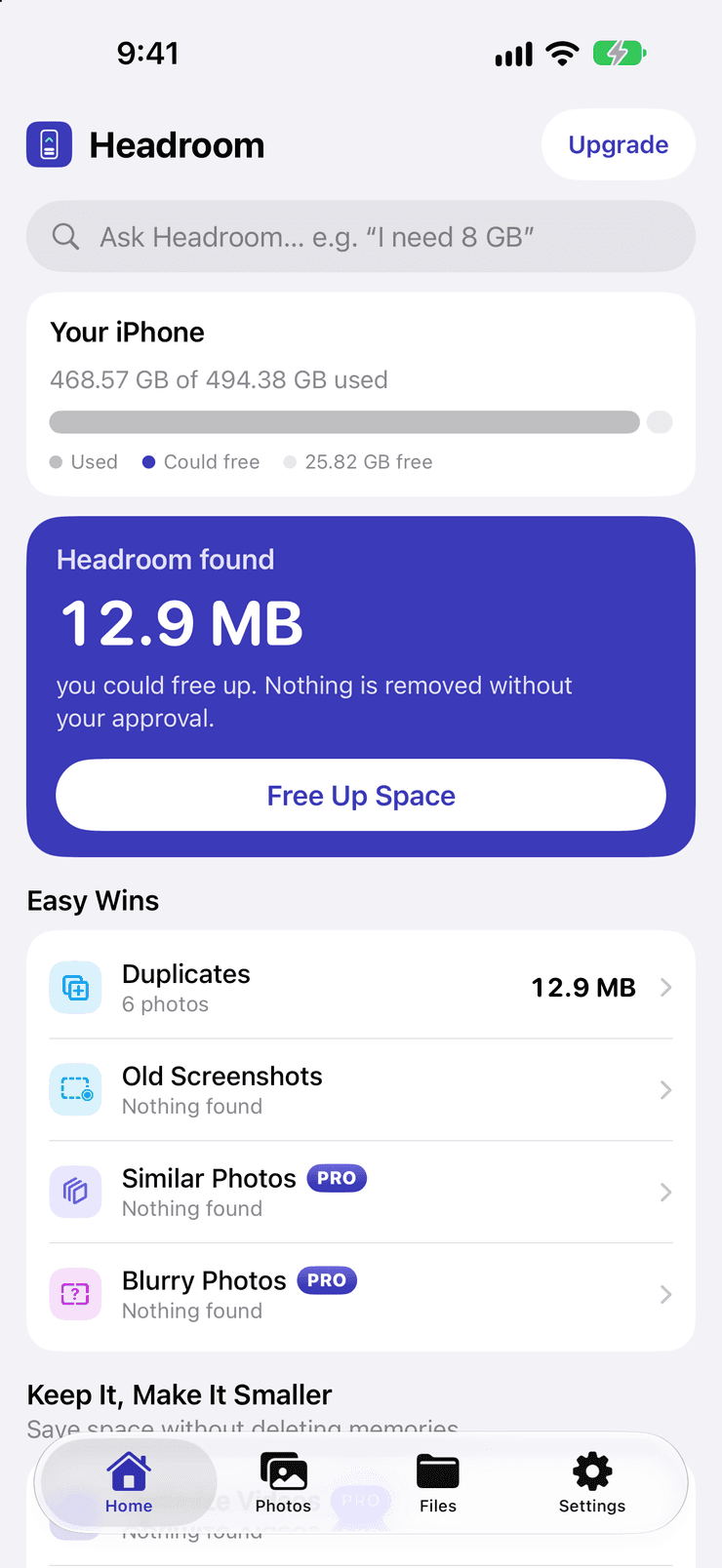
Headroom's home screen. A storage card reads 468.57 GB of 494.38 GB used with 25.82 GB free. Below it, a card reads “Headroom found 12.9 MB you could free up. Nothing is removed without your approval” above a Free Up Space button. Under Easy Wins: Duplicates, 6 photos, 12.9 MB; Old Screenshots, Similar Photos (Pro) and Blurry Photos (Pro), each reading Nothing found. An Ask Headroom box at the top suggests “I need 8 GB”.

Screens show a small test library, so the amounts are small.

How it works

Not a cleaner. A plan.

Most apps ask what you want to delete. Headroom asks how much space you need — then does the thinking.

  1. 1

    Pick an amount

    1, 5, 10, 20 GB, an iOS update, or a custom amount.

  2. 2

    Review the plan

    Easy wins first, smaller copies instead of deletions, and a clear impact rating.

  3. 3

    Approve

    Tap once, confirm Apple's dialog. Removed items stay in Recently Deleted for 30 days.

Space goal

Tell it how much. It finds the rest.

Need room for an update or a trip? Choose the amount and Headroom builds the lowest-loss plan to get there.

  • Presets for iOS updates and “everything”
  • Untick anything — the plan refills from elsewhere
  • Save plans you like to reuse

Photos

Keep the best shot.

Duplicates and near-identical photos are grouped, and the sharpest, best-lit one — best faces included — is kept for you.

  • Exact duplicates and similar bursts
  • Blurry and accidental pocket shots
  • Screenshots sorted, expired ones flagged

Keep it, make it smaller

Shrink instead of delete.

Optimize videos and photos into smaller copies. Date, place, favorites and albums stay exactly as they were.

  • Safe, Balanced or Max Space quality
  • HDR, Cinematic, Slo-mo and RAW left untouched
  • Pauses when your iPhone is warm or low on battery

Files

Files, sorted.

Connect the folders you choose. Headroom finds large, old and duplicate files — and zips older versions of documents.

  • Only folders you pick, nothing else
  • Exact-match duplicates
  • “Proposal Final 2” and friends, grouped

A look inside

Every screen is the real app. They come from a small test library, so the amounts are small — yours will be whatever your iPhone holds.

Headroom's home screen. A storage card reads 468.57 GB of 494.38 GB used with 25.82 GB free. Below it, a card reads “Headroom found 12.9 MB you could free up. Nothing is removed without your approval” above a Free Up Space button. Under Easy Wins: Duplicates, 6 photos, 12.9 MB; Old Screenshots, Similar Photos (Pro) and Blurry Photos (Pro), each reading Nothing found. An Ask Headroom box at the top suggests “I need 8 GB”.

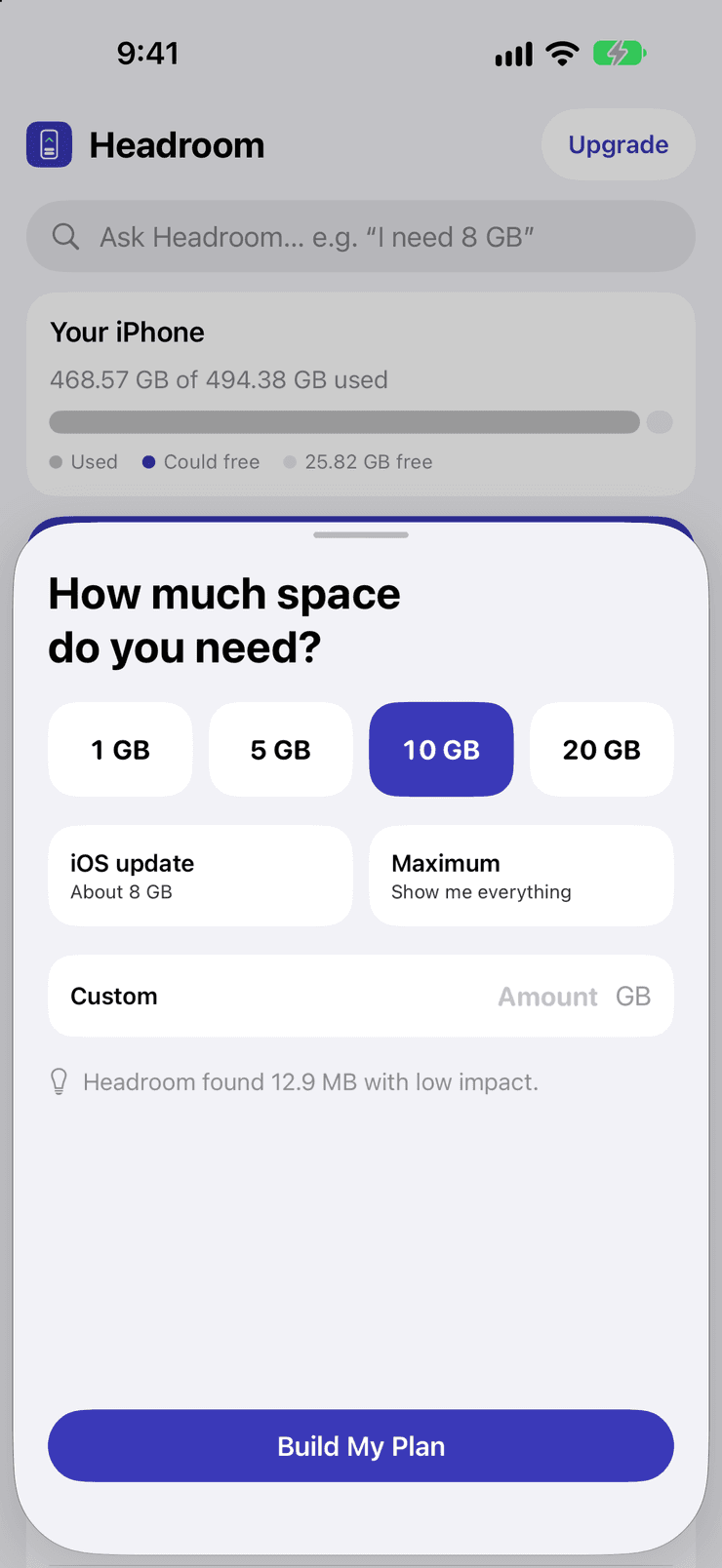
Need more space? Headroom finds it.

The “How much space do you need?” sheet over the home screen: presets of 1, 5, 10 and 20 GB with 10 GB selected, an iOS update option of about 8 GB, a Maximum option that shows everything, a Custom amount field and a Build My Plan button. A note reads that Headroom found 12.9 MB with low impact.

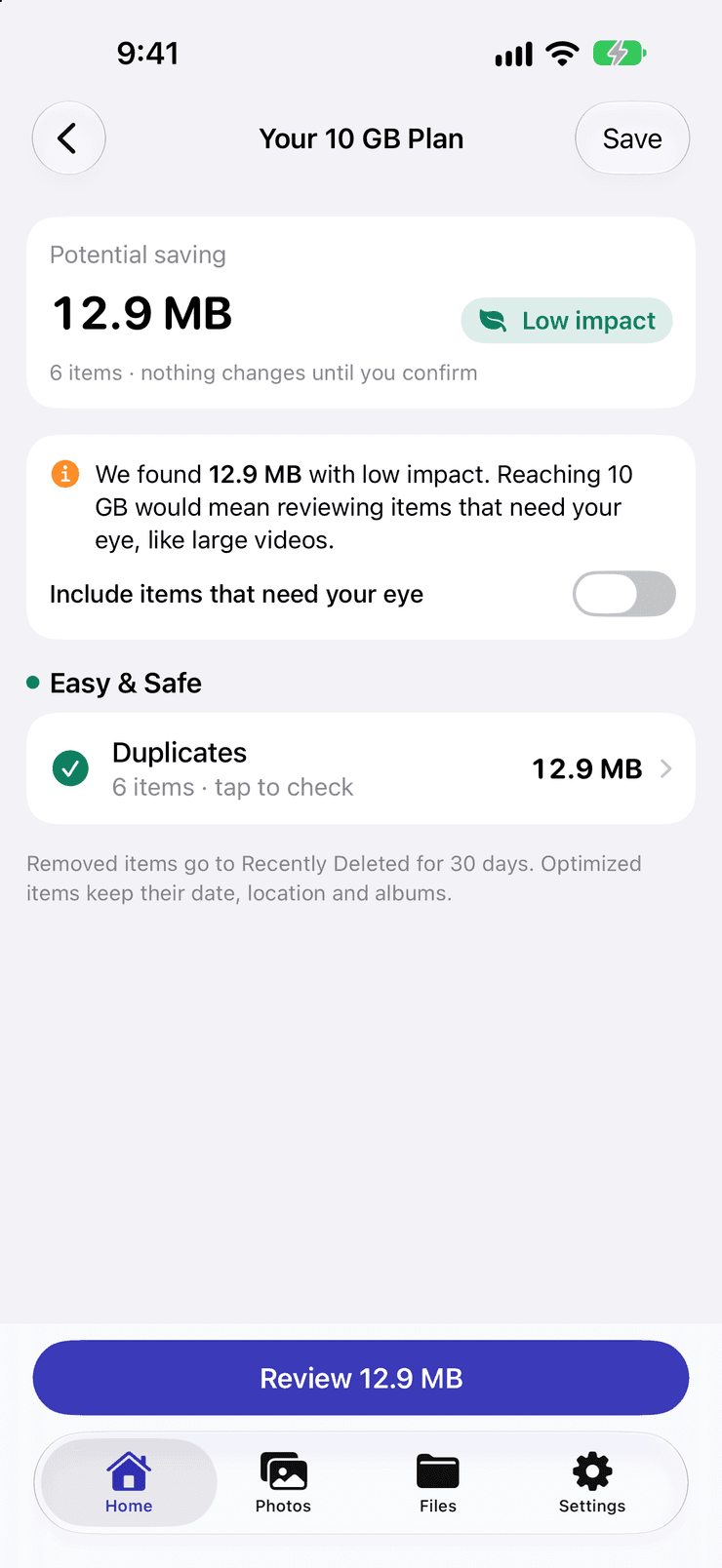
Tell us how much you need.

A 10 GB plan. The potential saving is 12.9 MB across 6 items, marked Low impact, with a note that nothing changes until you confirm. A message explains that reaching 10 GB would mean reviewing items that need your eye, like large videos, with an “Include items that need your eye” switch turned off. Under Easy & Safe, Duplicates, 6 items, 12.9 MB. A Review 12.9 MB button sits at the bottom.

A plan that loses less.

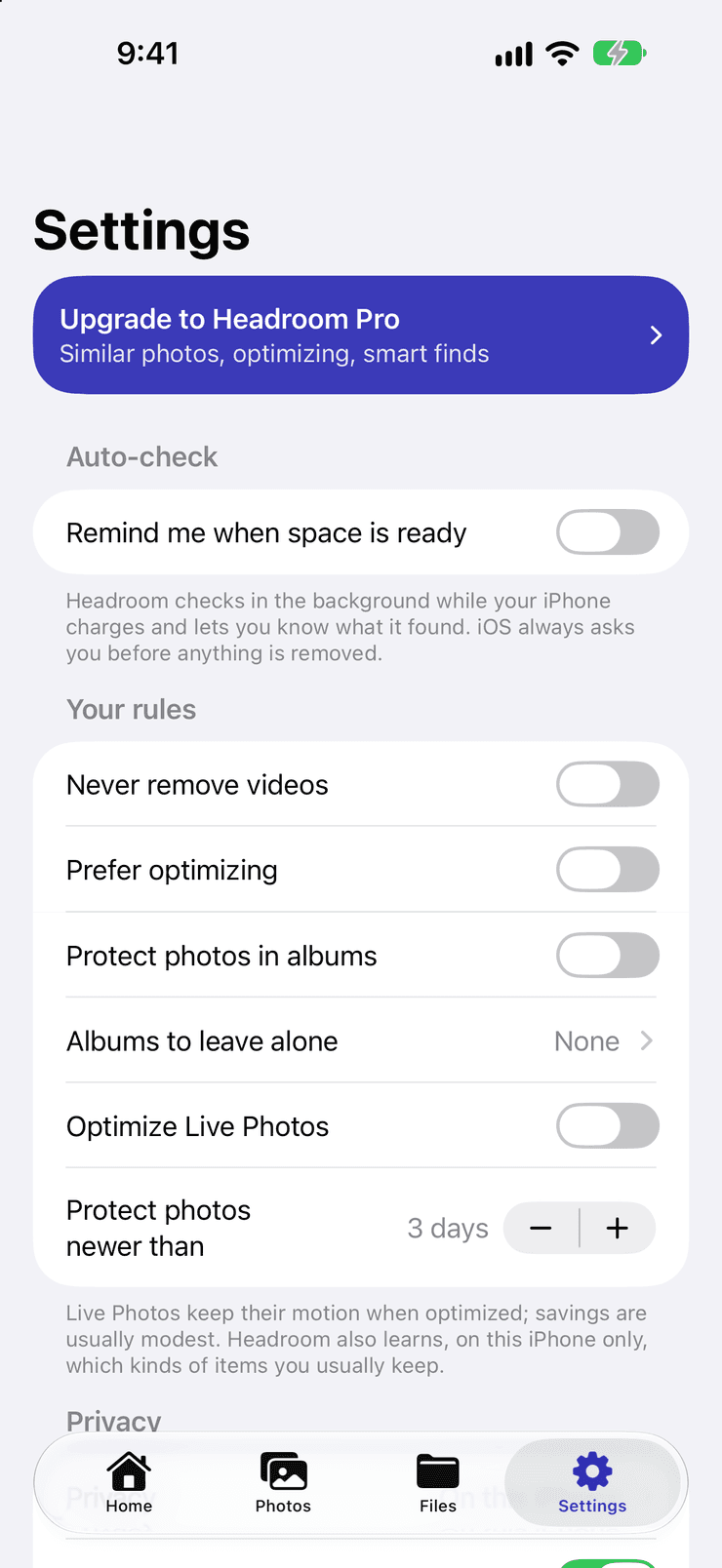
Headroom's Settings. An Upgrade to Headroom Pro banner mentions similar photos, optimizing and smart finds. An Auto-check switch, off, offers to remind you when space is ready. Under Your rules: never remove videos, prefer optimizing, protect photos in albums, albums to leave alone (None), optimize Live Photos, and protect photos newer than 3 days — with a note that Headroom learns, on this iPhone only, which kinds of items you usually keep.

You set the rules.

Albums to leave alone, videos to never remove, photos too new to touch.

Privacy

Private by design.

Everything Headroom learns about your library is worked out on your iPhone — and stays there.

  • Photos and files never leave your device
  • No account, no tracking, no ads
  • Nothing removed without your approval
  • Your rules: albums to leave alone

On supported devices, Headroom also explains why a screenshot may no longer be needed, and understands your questions in your own words. Everything works without it too.

Good to know

What it can and cannot do.

  • Space comes back after Recently Deleted

    Removed photos go to Recently Deleted for 30 days, so the space comes back once you empty it there.

  • It works on your photos, not other apps

    iOS doesn't let any app clear other apps' data or system storage. Headroom focuses on your photos, videos and the folders you choose.

  • iCloud Photos removes everywhere

    If you use iCloud Photos, removing a photo removes it from all your devices that use it. Optimized copies sync like any other photo.

More answers, and a way to reach us, on the support page

What you need

Runs on iPhone — and not only the newest iOS.

  • Supported

    iPhone

    Earlier versions of iOS work too

    Everything Headroom does is analysed on the phone, with Apple's own on-device frameworks. Photos access is asked for when you start, and in Files only the folders you choose are looked at.

  • Optional extra

    iPhone with Apple Intelligence

    On supported devices

    Explains why a screenshot may no longer be needed, and understands your questions in your own words. Everything works without it too.

Pricing

Fair, simple pricing.

Review and remove duplicates, screenshots and large videos for free. Headroom Pro unlocks everything else — try it free for 14 days.

Best value

Annual

US$19.99

per year

14 days free

3 Months

US$6.99

every 3 months

14 days free

Monthly

US$2.99

per month

14 days free

Prices in US dollars; the App Store shows your local price. Subscriptions renew automatically unless cancelled at least 24 hours before the end of the period. Manage or cancel in Settings › Apple Account › Subscriptions.

Make space. Keep what matters.

Free to download. 14-day free trial of Pro.

Get notified at launch

Headroom is not affiliated with Apple Inc.

Chat on WhatsApp