What Running an AI Office Taught Us About Handing Work to AI
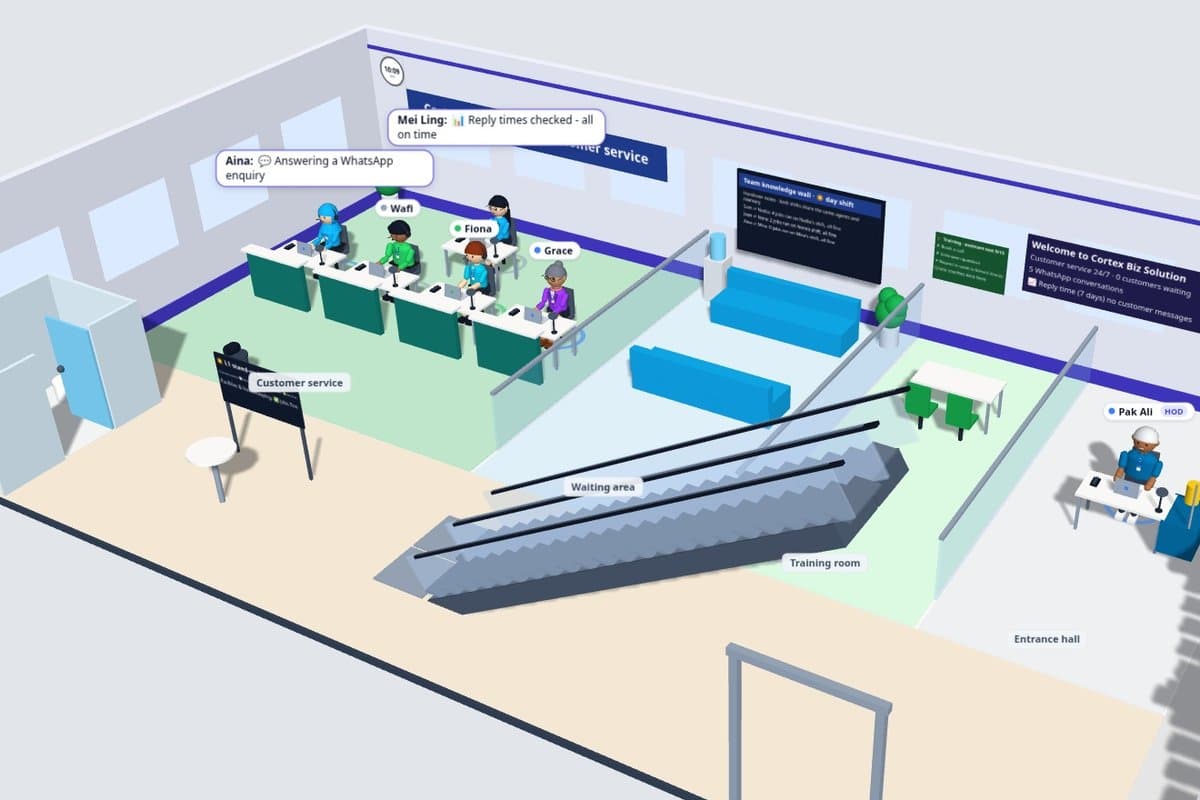
Picture an ordinary evening at a small software company. At 11:40 a WhatsApp message arrives asking whether we can quote for an app. A server's disk has crept past the point where someone should tidy it, a follow-up to a lead is due, and a social post is waiting for a check. None of these jobs is hard. There are simply hundreds of them, every day, and in a small company they all land on the same few people.
That is the problem we set out to solve for ourselves. The result is Cortex HQ, our own AI office: 52 AI staff in 21 departments, spread across eight floors of a 3D building that we use as our dashboard. The building is a live view of our own systems. The staff, their jobs and their status come from our servers; the walking and the speech bubbles are animation.
This post is about what running it has taught us, because the lessons apply to any business thinking about handing work to AI.
Give every AI one job, not a vague brief
The first thing we did was stop asking one assistant to "help with the business". Each AI staff member owns one job: answering WhatsApp enquiries in the day, answering them at night, writing blog drafts, watching the servers, preparing follow-ups, checking costs. Each one sits in a department, and each department has a head.
A narrow job is easier to check. When the WhatsApp assistant answers a question, we know exactly what it was supposed to do, so we can tell whether it did it. When an assistant is asked to do everything, nobody can say what "good" looks like.
If you are starting out, write the job down the way you would for a new hire: what comes in, what should go out, and when to ask a person. Our WhatsApp enquiry post covers that hand-off in detail.
Check prepared work before it goes out
AI makes mistakes, and it makes them confidently. So in our office, prepared work such as a post, a report or a follow-up draft does not go straight out. It is checked first by the author's supervisor and by the reviewers who matter for that kind of work, such as legal for claims or the content lead for posts. If they say hold, the work stops there and the reason is recorded. Live WhatsApp replies cannot wait for a review, so they are checked a different way, which we cover below.
This is not a formality. This week the review held a set of social posts twice: once because a post opened with us instead of the reader's problem, and once because a caption said the night shift "checks every site", which claimed more than the job actually does. Both were fair catches. Both would have gone out if the writer had been the only check.
For a business, the takeaway is simple: decide who checks the AI's work before you decide what the AI should do. Then make "hold" a normal, visible outcome rather than an error.
Clear the memory before it gets slow and costly
An AI assistant carries its conversation with it. Over days, that history grows. Every reply has to read through more of it, which can make replies slower and costlier, and old details can crowd out what matters now.
In our office, when an AI staff member's memory is full, they take what the 3D building shows as a toilet break. Their old conversation is cleared and their old notes move to an archive they no longer read. Their lasting facts, decisions and latest tasks stay with them, so they come back focused on their own work. We used to clear everyone's memory on a fixed schedule. Clearing it only when it is full turned out to be better: busy staff get a fresh start when they need one, and quiet staff keep their context.
If you use AI assistants, ask how long their conversations get and what happens to the old parts. "It remembers everything" sounds like a feature until the bill arrives.
Run stand-ups from records, not memory
Every morning, each department holds a stand-up: what ran yesterday, what is due today, and what is blocked. The important detail is where the answers come from. Each team reads its real job records rather than describing its work from memory, so a failed job shows up as failed even if nobody noticed it.
Anyone who is busy during the stand-up gets a catch-up later instead of being skipped. That small rule stopped work from quietly falling between days.
Test the AI the way you would train a person
This is how we check the work that cannot wait for a review. Quality slips quietly. An assistant that answered well last month can drift after a change to its instructions or its information. So our customer service assistant sits regular exams built from real scenarios: someone asking for a call, someone asking to speak to the owner, a question it should not guess at.
When an answer slips, our training coach shows which questions failed and drafts a fix to the instructions. A person approves the fix before it goes live. The useful part is not the score; it is that each failed question points to a specific instruction to change, such as offering booking times instead of asking more questions.
One update instead of a stream of pings
Early on, every job messaged us when it finished something. It was too much. Now everything that needs a decision goes through one personal assistant, who sends one update in the morning, one at lunchtime and one in the evening, and only when something new has arrived. A dashboard shows what is still waiting. Genuinely urgent things, such as a site going down, still come through straight away.
The board of AI executives also meets to go through pending decisions first, so each one arrives with a recommendation attached. We only see the decisions that need us.
Keep the cost proportional to the job
Not every task needs the strongest model. In our office, routine chats between staff run on a smaller, cheaper model. Customer replies and code use the stronger one. Hand-offs between staff are capped, so one question cannot set off a long chain of AI conversations. We also track usage against a weekly budget, and optional jobs wait when we are ahead of it.
That last point applied to this post: our usual blog pipeline was paused by the budget check this week, so this one was drafted outside the pipeline.
Where we would start in your business
You do not need 52 AI staff, or a 3D building, to use any of this. We would start with one or two jobs that eat your week, usually customer enquiries or follow-ups. Write each job down. Decide who checks the output before it goes out. Choose how often you want to hear from it. Then add the next job once those run well.
Our business automation service covers this kind of setup, from WhatsApp assistants to connecting the systems you already use. Before any build, we agree the scope in writing; our fixed-price quote checklist explains what that should include.
FAQ
Is the AI office real?
Yes. The 3D building is a live view of our own dashboard: each AI staff member, their jobs and their status come from our servers. The walking and speech bubbles are animation.
Do the AI staff make decisions on their own?
Routine work runs on its own within its job. Decisions that matter, such as spending money or publishing something new, come to a person with a recommendation.
Can you set this up for my business?
Yes. Every setup starts from your own jobs, so we begin with a conversation about which ones take up your week.
Want to see which jobs AI could take off your plate? Book a free consultation with Cortex Solution.
Ready to apply these insights?
Our team can help you implement these strategies and solve your specific challenges.
Schedule a ConsultationNeed this for your business? See our web, mobile and automation services.
See how we implement this
How to Automate WhatsApp Enquiries Without Sounding Like a Bot
A useful WhatsApp lead assistant should answer from known business facts, ask one sensible question, and hand the conversation to a person before it becomes awkward.
Connect the Systems You Have Before Building Another App
Keep the tools that work. Start with one handoff, decide who owns each field, and make failed transfers visible before connecting more.
Before You Sign: What a Fixed-Price Software Quote Should Include
A fixed number is useful only when the work around it is clear. Here is what we look for in a software quote before anyone signs it.
When a Spreadsheet Stops Being an Operations System
A spreadsheet can run a process for years, then quietly become the place where work goes missing. Here are the signs that an SME needs a system, not a larger workbook.